Scispot MCP connects Claude to the same structured records, workflows, and controls your lab already uses in Scispot. Instead of pasting CSVs or copying experiment notes into chat, scientists, lab managers, and QA teams can ask plain-English questions and let Claude retrieve and act on live lab data, all within existing permissions and audit trails.
Why labs need live context
AI is already good at explaining assays, reviewing protocols, and writing code. The hard part is knowing what is actually happening in your lab right now: where Sample A-184 is stored, which protocol version was used yesterday, which reagent lots are about to expire, or why a specific assay is blocked. Teams have traditionally reconstructed that context by hand through exports, spreadsheets, and long status messages. Scispot MCP removes that manual step by giving Claude a governed interface to your lab’s operational record.
What MCP enables in Scispot
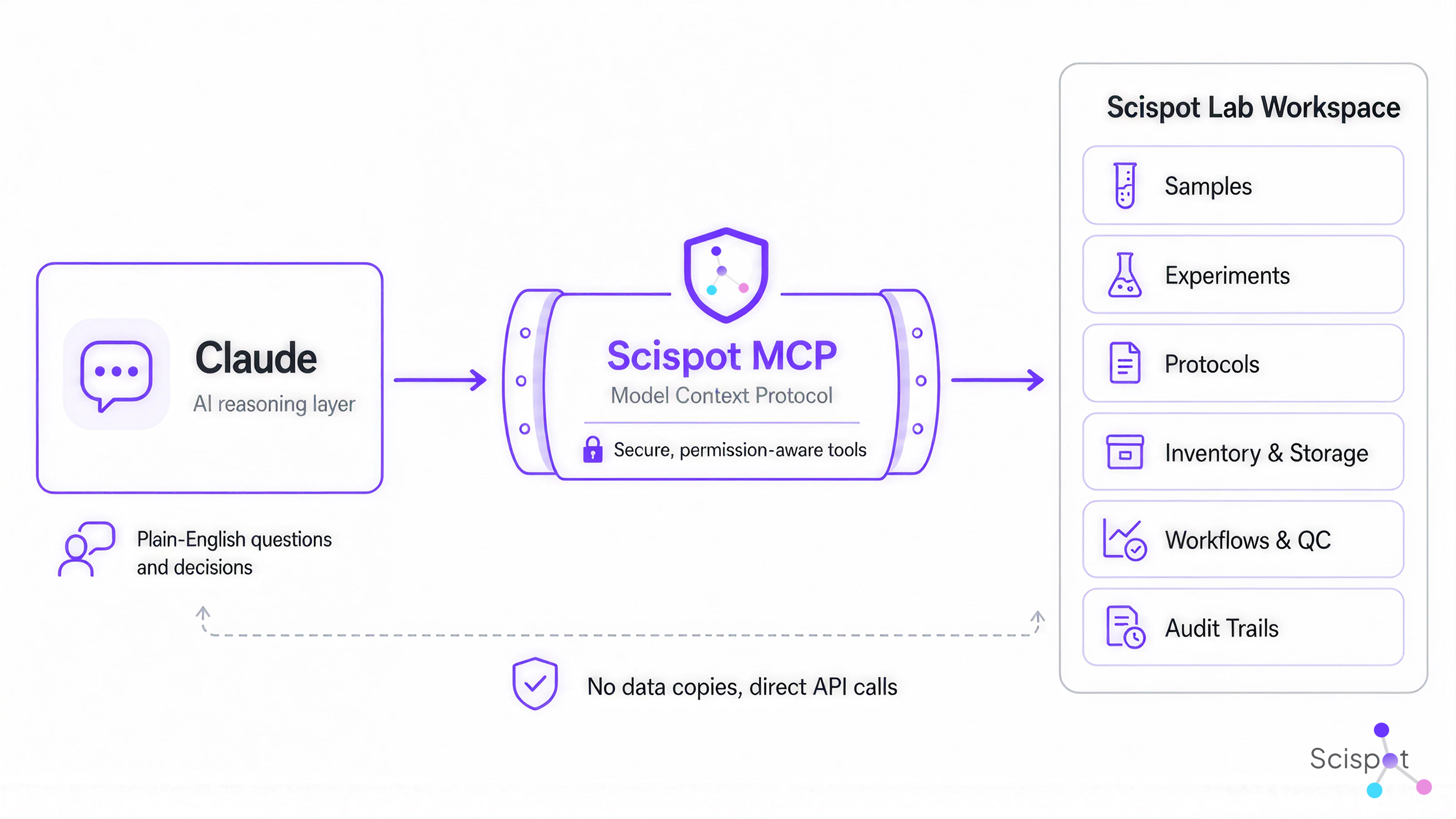
Model Context Protocol is an open standard that lets AI tools call external systems through a consistent interface. Scispot uses MCP to expose a set of approved tools that let Claude search samples, retrieve experiments, inspect inventory and storage, create and update records, and navigate linked scientific context such as manifests, Labflows, and ELN entries. Scispot stays the system of record. Claude becomes a natural-language reasoning layer on top of it.
Instead of starting every chat with a blank context window, Claude can work from what your lab has already modeled: sample identities, batch history, protocols, manifests, storage locations, workflow states, and user permissions. The lab no longer has to re-explain itself every time someone opens an AI window.
Tools across the Scispot workspace
The Scispot MCP server currently exposes 27 tools across Labsheets, ELN Labspaces, manifests, storage, Labflows, and image retrieval. Claude can:
- List Labsheets, inspect schemas, search and filter rows, retrieve records by UUID, add and update rows, and move through folder hierarchies.
- Link structured records, such as samples or results, to experiments, protocols, and documents that explain what happened and why.
- Navigate ELN Labspaces, list experiments and protocols, create records, append content, and connect notebook entries to Labsheet data.
- Pull manifests for plates, boxes, racks, and containers via barcodes or human-readable IDs, explore storage locations, and access linked images when visual context is part of a record.
These tools turn Claude from a generic scientific assistant into an interface for real lab operations.
Follow the full story of a sample
Investigating a single sample often means hopping across several systems to reconstruct its lineage. With Scispot MCP, a scientist can ask Claude to find a sample and show its source material, current storage location, experiment history, linked protocol, latest result, and every plate or container where it has appeared. Claude can then compare that sample against others in the same batch, flag differences in preparation method, protocol version, reagent lot, or QC status, and help the scientist focus on the records that matter.
The key is that the experimental context, physical location, and QC history stay connected in Scispot. Claude helps reason across those links instead of analyzing a detached spreadsheet in isolation.
Turn batch investigations into connected workflows
The same pattern applies when something goes wrong at scale. Lab leads can ask Claude to find every sample in a batch with a status like Failed, Repeat, or Under Investigation, then return an investigation view that includes linked experiments, assays, controls, protocol versions, reagent lots, analysts, and storage locations. From there, Claude can create a follow-up investigation experiment, link affected samples, add a summary of open questions, and create a checklist of missing information, without changing sample dispositions.
Investigations no longer start from a blank document. They start from the lab’s existing evidence, assembled around the issue.
Make inventory answerable in plain English
Inventory systems usually hold enough data. The real question is whether you can turn that data into decisions: do you have enough approved reagent for the next run, is the right lot available, is it stored correctly, and will it expire before a planned experiment. With Scispot MCP, scientists and managers can ask plain-English questions about reagent availability, expiring lots, and project dependencies. Claude uses Scispot’s inventory records and linked workflows to return answers grounded in live data, while keeping every response tied back to Scispot records for verification.
Focus meetings on exceptions, not status
Many lab meetings are still spent gathering status instead of making decisions. Using the Scispot connector, a lab manager can ask Claude for a live summary of active experiments grouped by status, with reasons for blocked work, owners, affected samples, and next actions. They can follow up with targeted queries about experiments that have stayed In Progress too long or studies at risk of missing expected completion dates because of inventory, instrument, sample, or review dependencies.
This shifts meeting time from reconstructing status to resolving exceptions.
Serve external customers faster, with less risk
Service labs and CROs often burn time answering status requests. When study, sample, workflow, and result data live in Scispot, account teams can ask Claude for a customer-ready status summary that includes received samples, pending work, completed assays, repeat runs, results under review, blockers, and current expected report dates. They can also set clear boundaries (for example, excluding internal comments and investigation notes) and ask Claude to link each statement to its source record in Scispot so they can verify everything before sending it.
That reduces turnaround time and lowers the chance of sending outdated or incomplete information.
Tighten the loop between wet lab and computation
Computational teams often receive experimental context via static files or local exports. With Scispot MCP, they can ask Claude or Claude Code to pull samples from specific runs with the scientific and operational metadata they need, including IDs, source materials, extraction methods, library prep batches, run IDs, QC status, and linked experiments. Once the analysis is done, they can ask Claude to create experiment summaries, link source sample records, document analysis versions, output locations, QC summaries, and open questions. This keeps wet-lab work, computational analysis, and interpretation in one connected loop.
Because Scispot is available as a remote connector, teams can use it across supported Claude surfaces, including web, desktop, mobile, and code-focused environments.
Use AI on top of live instrument results
Scispot MCP becomes even more useful alongside Scispot’s instrument integration and workflow features such as GLUE, Smart Actions, the Workflow Engine, and Trust Vault. Instrument outputs can be captured, connected to relevant samples and experiments, transformed into structured results with QC rules applied, and routed for review. From there, scientists can ask Claude to review runs, highlight failed controls, flag samples outside defined ranges, spot missing metadata, and identify results that need attention. They can also ask Claude to create repeat-run experiments, link source records, and add reasons and unresolved QC questions.
The raw files, structured results, sample context, review work, and follow-up experiments stay connected. Trust Vault keeps audit, approval, signature, validation, and inspection evidence attached to governed workflows, while Scispot’s compliance architecture ties ELN records, LIMS data, files, transformations, controls, and evidence together.
Build audit evidence as you work
Audit prep often means reconstructing evidence from scattered systems. With Scispot MCP, QA teams can ask Claude to build traceability indexes for batches, showing samples, source materials, experiments, protocol versions, instrument records, results, approvals, and supporting documents connected in Scispot, and flag missing links or required fields. They can also search for recently completed experiments missing key relationships or approvals.
Scispot supports audit trails, role-based access, approvals, electronic signatures, source lineage, and Part 11-controlled workflows when configured and validated for a lab’s intended use. The MCP connector doesn’t replace quality oversight or regulated procedures. It makes governed evidence easier to find and connect while work is still active.
Read, write, and link without shadow systems
Many AI integrations create extra data copies and sync jobs. Scispot MCP avoids that. Each MCP tool call goes directly to the customer’s Scispot workspace through the API, so searches, writes, and links all operate on the live system of record. The same access rules and audit controls that apply inside Scispot apply to MCP-driven actions. That keeps the conversational interface flexible while preserving one governed source of truth.
Permission-aware AI built for regulated labs
In regulated environments, the key question is not just what AI can do, but what it is allowed to do. Scispot MCP uses an OAuth flow with PKCE and authorized tokens, aligns with the MCP authorization spec, and relies on Scispot’s existing API controls. Unauthenticated requests are rejected, and Claude inherits each user’s permissions from Scispot. If a user cannot see a record in Scispot, they cannot retrieve it through Claude.
Different roles can have different capabilities: scientists can read and update records in their projects, managers can see across workflows, QA can review widely while writing narrowly, and external collaborators can be limited to defined spaces. On team and enterprise AI plans, organization owners can limit which connector actions are allowed and expand them later once workflows and controls are vetted.
AI does not get a “master key” to the lab. It operates within user permissions and organization policies.
Why a directory listing matters
Scispot MCP has already been available to customers. Its listing in a major AI connector directory makes it easier for labs to find, evaluate, connect, and manage it through the same interface they use for other Claude integrations. Directory submissions go through review for safety, security, and compatibility. The listing means Scispot’s MCP implementation has completed that process.sunpeak+1
For teams, this turns Scispot MCP from a developer proof-of-concept into a practical interface that scientists, managers, data teams, operations, and quality can use. They can open the listing, review capabilities, connect accounts, authenticate, and start using Scispot within Claude rather than maintaining custom connector configs.
Scispot provides lab context. Claude provides the reasoning.
Claude is useful because it understands language, reasons across information, generates content, and uses tools. It becomes far more valuable when connected to reliable context. Scispot provides that context: samples, batches, experiments, protocols, storage, manifests, results, workflow states, record relationships, and user permissions. Claude gives people a natural way to query and direct work across that context. Scispot keeps the operating record structured, linked, governed, and traceable.
Scientists no longer have to navigate the database before they can ask the question. Managers no longer have to assemble status reports by hand. Computational teams no longer have to rebuild experimental context from exports. Quality teams no longer have to begin every review by hunting for evidence. The conversation becomes an interface to the lab’s digital brain.
The agent-ready lab starts with connected context
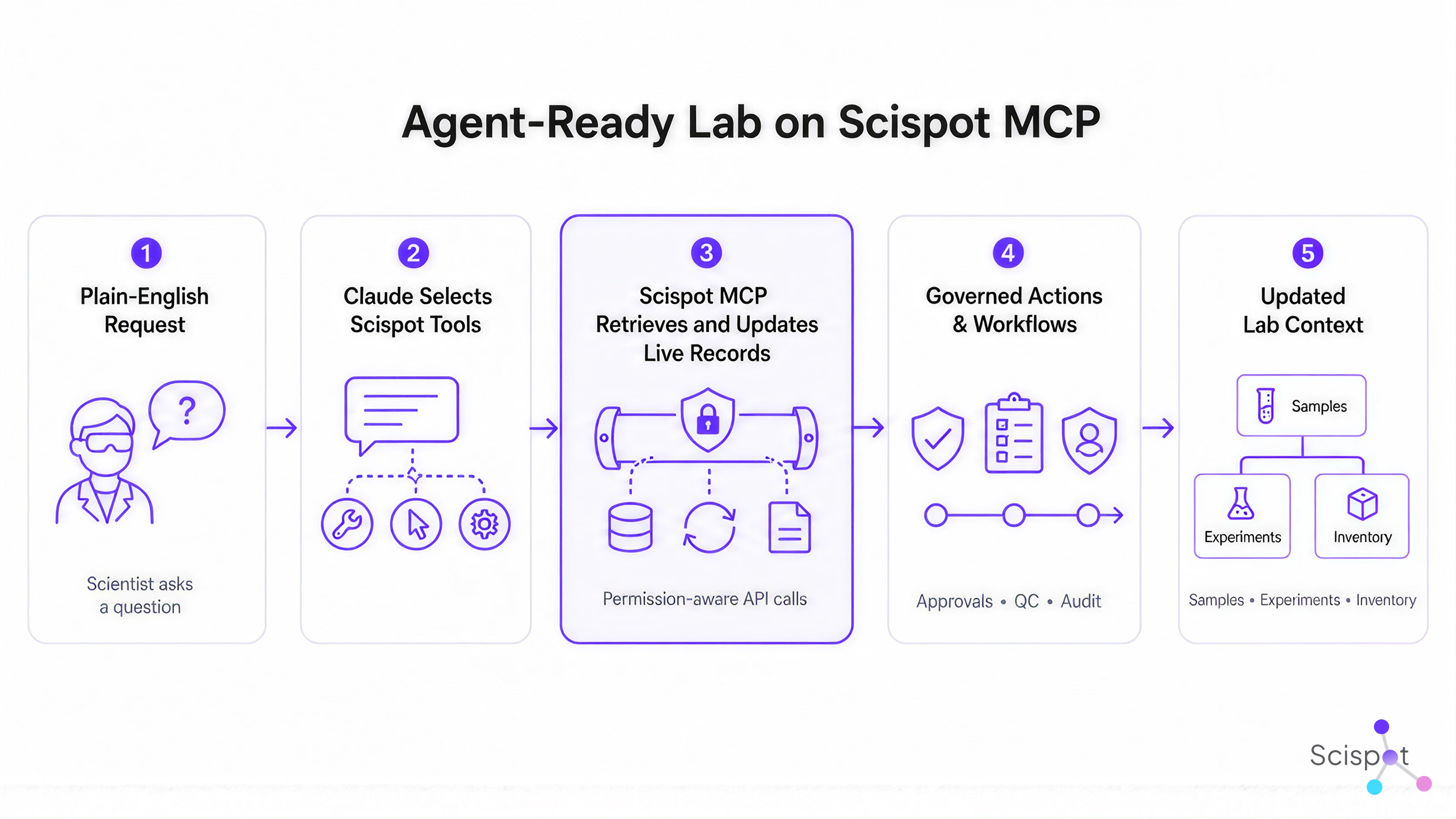
An agent-ready lab is not created by dropping a chatbot on top of an ELN. It needs structured records, connected samples and experiments, governed access, tools that can retrieve information and perform defined actions, and clear links between work, data, decisions, and evidence. Scispot MCP gives Claude that governed access to Scispot tools and records.
Users can start with a plain-English request. Claude can choose the right Scispot tools, retrieve the relevant records, reason across their relationships, and then help prepare summaries, identify gaps, create approved records, update structured data, or connect the next step to its source context. Every action returns to the same layer where the lab already manages scientific work.
This is how AI moves from answering questions about science to helping scientists run science.
Connect Scispot to Claude
Scispot MCP is now available through Anthropic’s Connector Directory.
Open the Scispot connector, review its capabilities, connect your account, and authenticate your Scispot workspace. Once connected, Claude can use the available Scispot tools when they are relevant to your request and permitted by your access.
Claude already understands science. Scispot gives it the live lab context, governed tools, and trusted data needed to help move science forward.

%20Comprehensive%20Guide.avif)
.webp)